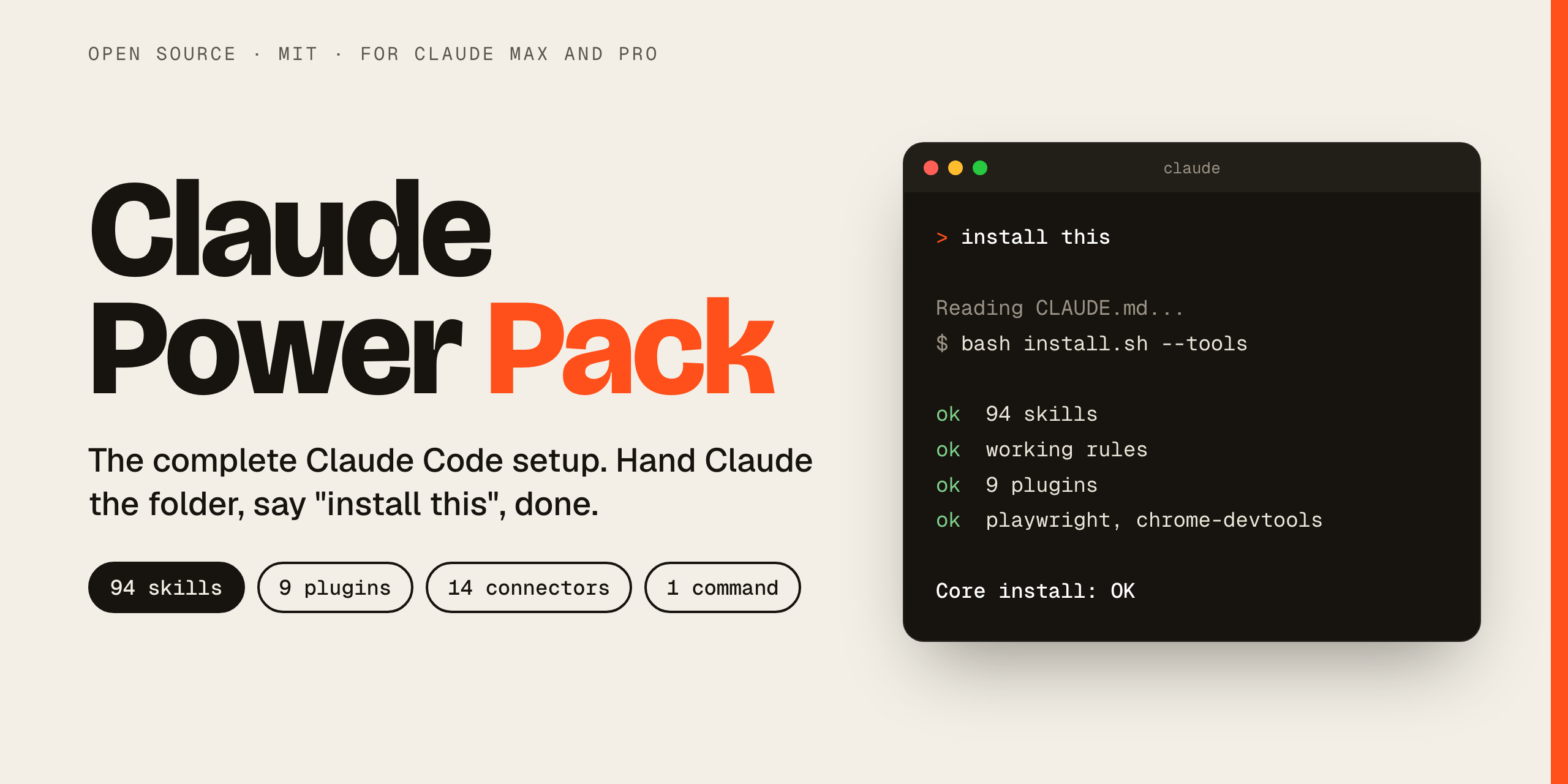
Claude Power Pack is a free, open-source, one-command installer for a complete Claude Code setup: 94 skills, 9 plugins, working rules, tuned settings, two browser tools and a guide to the connectors worth turning on.
Install it once, and Claude works like a careful senior teammate from day one.
Open that folder in Claude Code (or the Code tab of the Claude desktop app) and say:
> install this
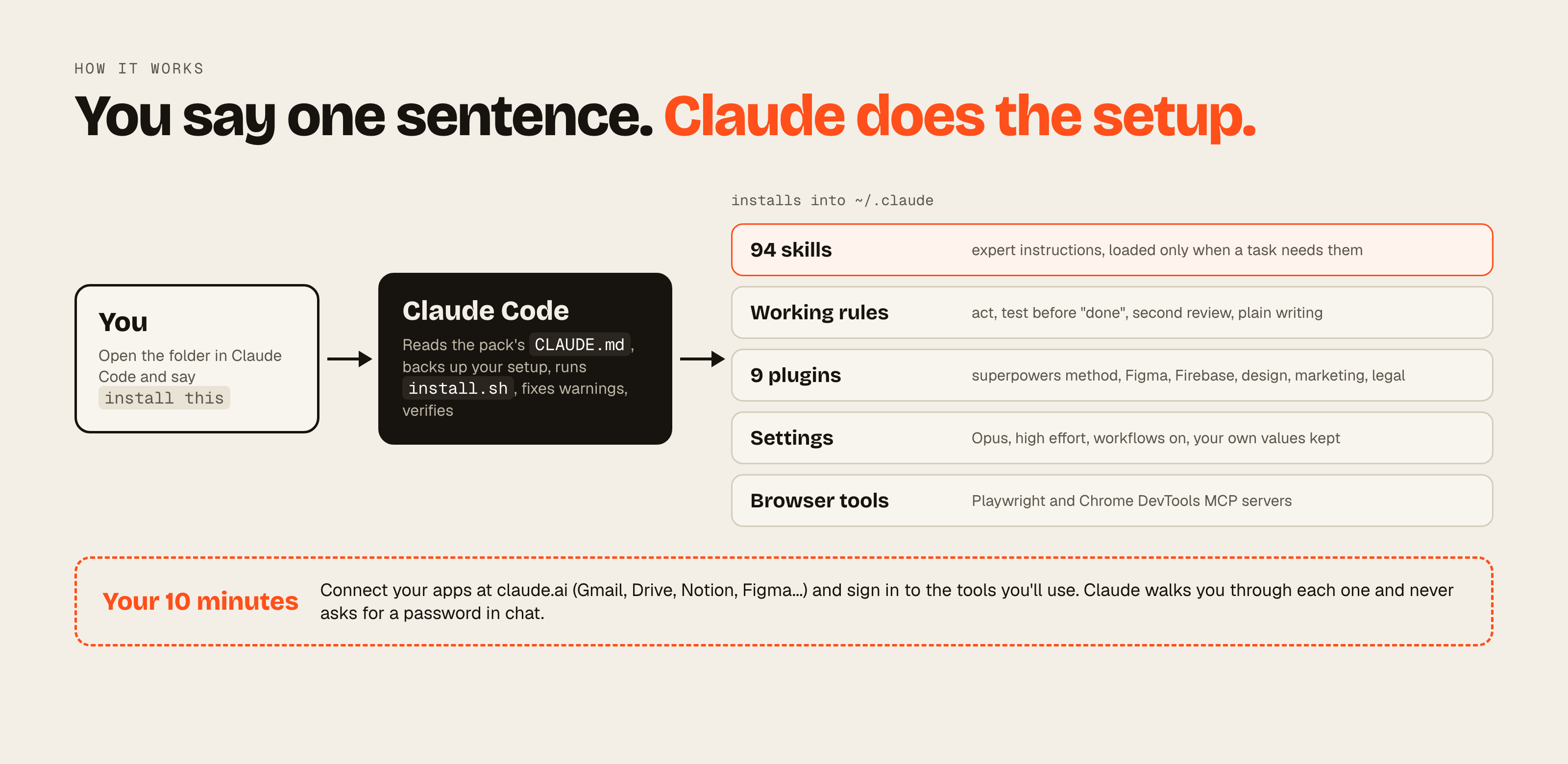
Claude reads the pack's CLAUDE.md, runs the installer, fixes what it can, checks the result and walks you through the logins only you can do.
Hands-on
Run the installer yourself
In Terminal:
$ git clone https://github.com/mppyxx/claude-power-pack~/claude-power-pack$ cd ~/claude-power-pack$ bash install.sh --tools
--tools adds the command-line tools the skills use and a 490 MB speech model. Leave it off for a lighter install, or run bash install.sh --dry-run first to see every change.
No git? Download the ZIP and unzip it into your home folder. Then restart Claude Code so everything loads.
94skills, plus 9 optional extras
9plugins installed for you
14claude.ai connectors mapped out
15desktop extensions listed
1command to install it all
What changes
Four things change the day you install it.
01
It acts instead of asking
Claude maps the options, picks the best one and builds it. It only stops for things that truly need you: spending money, passwords, messages to people.
02
It tests before it says "done"
It runs the code, clicks through the screens and checks the output. Big jobs get a second, independent review before they count as finished.
03
Design that doesn't look AI-made
23 design skills steer away from the default purple-gradient template look, and the rules make Claude check the result in a real browser, at mobile width too.
04
It reaches your tools
Once you connect them: Gmail, Calendar, Drive, Notion, Figma, Canva, Vercel and more. Plus web research, scraping and browser automation out of the box.
What's inside
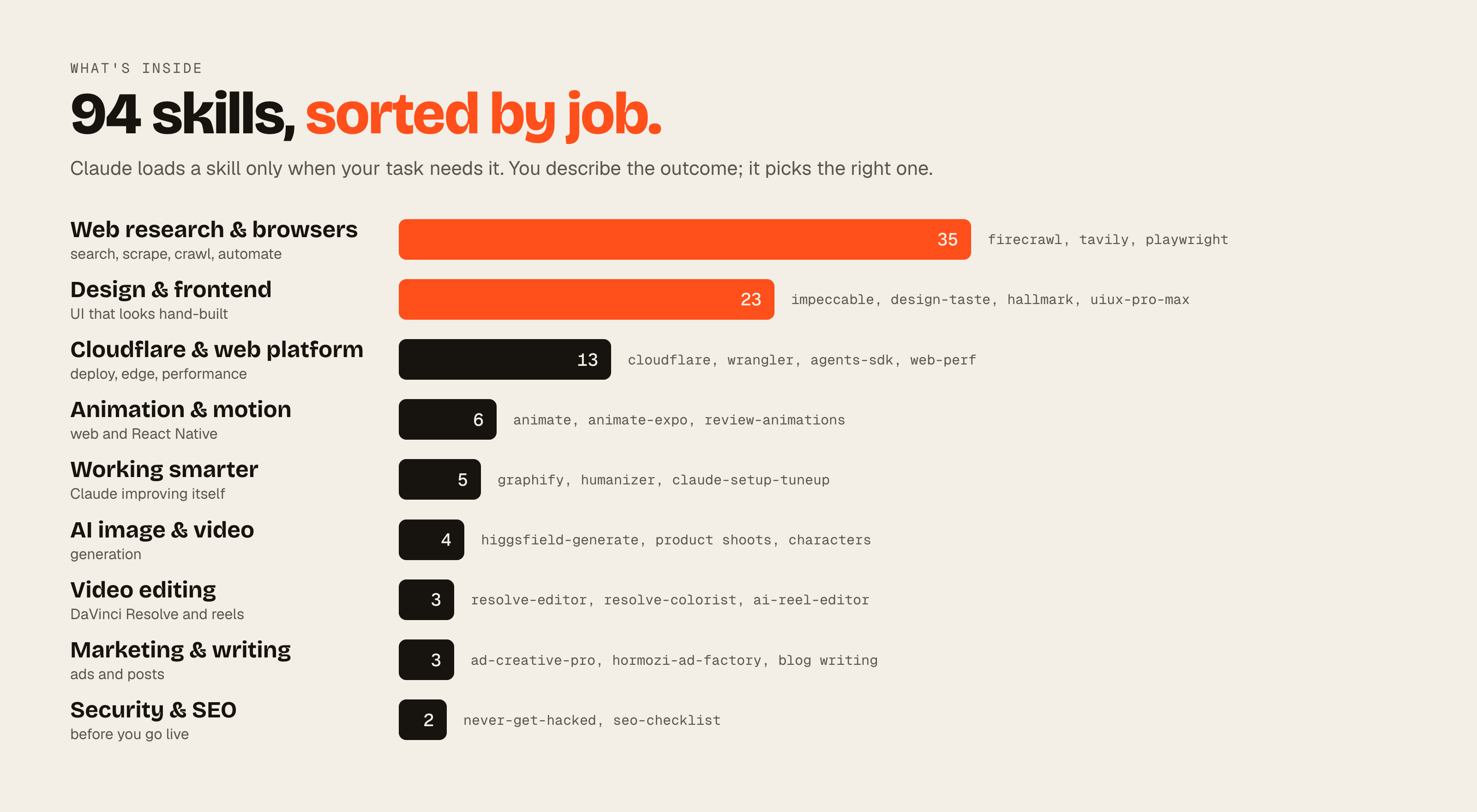
94 skills, sorted by job.
A skill is a set of expert instructions, sometimes with scripts, that Claude loads only when a task needs it. You never have to name one: describe what you want and Claude picks the right skill. Or type / and its name to call it directly.
Web research & browsers
search, scrape, crawl, automate
35 skills
firecrawl deep research, competitor intel, lead lists, site QA · tavily-research · playwright-cli · reel-reader watches a video link for you
never-get-hacked app security audit · seo-checklist 20-point audit and fixes
Plus 9 optional extras. Add them with bash install.sh --extras: ad-creative, ads-creative, ai-seo, copywriting, enhance-prompt, remotion-best-practices, responsive-design, security-review and seo-audit. Several overlap with the main set, which is why they're off by default.
Plugins bundle skills, commands and agents. Their skills show up as plugin:skill, for example superpowers:brainstorming.
superpowers
The working method: brainstorm before building, write a plan, test first, debug properly, verify before saying done. It also makes Claude check for a matching skill before every task.
andrej-karpathy-skills
Guidelines that stop the usual LLM coding mistakes: overbuilding, unasked changes, hidden assumptions.
figma
Design to code and code to design, design systems, FigJam diagrams, slides and motion. Uses the Figma connector.
firebase
Firebase projects, Firestore, auth and hosting through Firebase's own MCP server.
brag
Type /brag and it turns a project's website into a short launch video.
design
Design critique, accessibility audits, design systems, UX copy, research synthesis and dev handoff.
marketing
Campaign plans, content, email sequences, SEO audits, competitor briefs and performance reports.
brand-voice
Finds a brand's voice from its documents, writes guidelines and checks content against them.
legal
Contract review, NDA triage, compliance checks and risk notes. Not legal advice.
rules/CLAUDE.md
Working rules
Loaded into every session: act without hand-holding, test before claiming done, get an independent review on big work, write like a human. They're yours to edit.
settings.json
Settings
Opus, high effort and workflows on, plus the plugin sources and a small graphify hook. Any setting you already have keeps your value.
2 MCP servers
Browser tools
playwright for full browser automation and chrome-devtools for performance traces and Core Web Vitals. No keys needed.
Connectors
Hook up your apps. Then you're set.
Connections belong to your own accounts, so they can't ship in a package. The guide tells you which ones are worth it and where to switch each one on. Most are free.
claude.ai connectors 14
Gmailsearch, read, draft; asks before sending
Google Calendarevents and free time
Google Drivefind, read and create files
Notionpages and databases
Figmadesigns in and out
Canvacreate, resize and export
Verceldeploys, logs and domains
Makeautomations between apps
HubSpotCRM and marketing reports
Firecrawlweb search and scraping
Hugging Facemodels, datasets and papers
HiggsfieldAI image and video, paid credits
AhrefsSEO data, paid plan
Hostingersites and hosting, optional
Turn them on at claude.ai > Settings > Connectors. They then work in the Claude app, Claude Code and the desktop app.
Desktop extensions 15, Mac
Desktop Commander
Control your Mac
MacOS-MCP
Control Chrome
Apple Notes
iMessages
pdf-viewer
Figma
Shadcn UI
DaVinci Resolve
Filesystem
Apify
Tableau
Cloudglue
Minutes
Dashed ones are optional. The DaVinci Resolve link ships with Resolve Studio 21.1 or newer.
Built into the apps
Claude in Chrome
Computer use
Built-in browser
Scheduled tasks
Memory
Nothing to install. The guide says where to switch each one on.
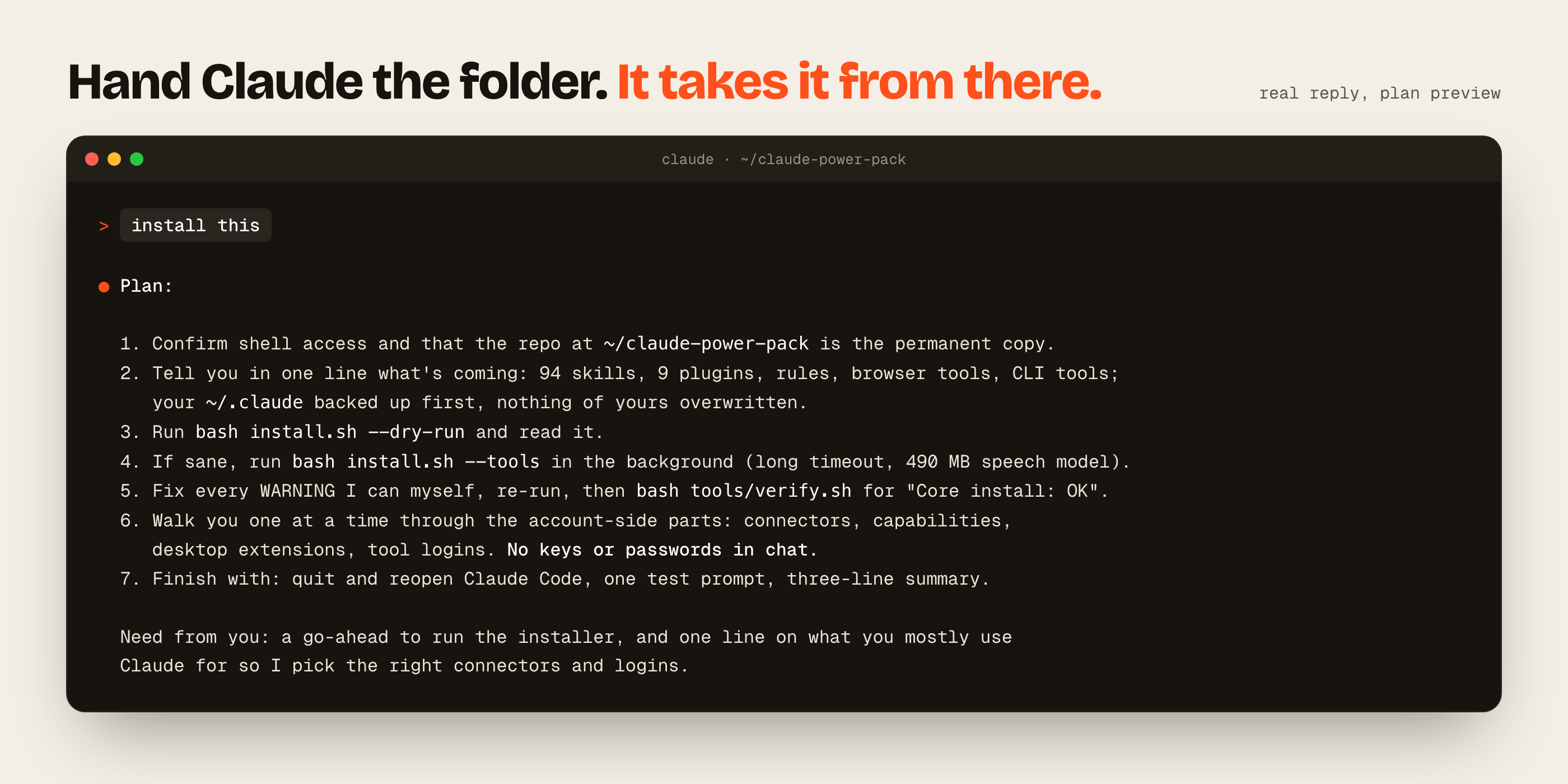
The folder includes a CLAUDE.md written for Claude. It runs a dry run, then the installer, fixes what it can, checks the result, and walks you through the logins one at a time. It never asks you to paste a password or key into the chat.
1
Get the apps
The Claude desktop app and Claude Code, signed in with your Claude account.
$ curl -fsSL https://claude.ai/install.sh | bash
2
Install the pack
Say "install this", or run it yourself. Your setup is backed up, then skills, rules, settings, plugins and MCP servers go in.
$ bash install.sh --tools
3
Connect and sign in
Connectors at claude.ai, then the desktop extensions and the tool logins you need. A check shows what's working.
$ bash tools/verify.sh
What happens when you say "install this".Claude's reply to "install this": a plan first, then it asks for the go-ahead.
Then just ask for what you want
"Build me a landing page for X"
A few quick questions, then a design skill builds it, opens it in a browser, screenshots desktop and mobile, and fixes what looks off.
"This is broken: ..."
Systematic debugging: reproduce it, find the root cause, fix it, prove the fix with a test.
"Research X for me"
firecrawl-deep-research or tavily-research, with sources you can click.
"Is my app secure?"
A never-get-hacked audit, then a fix plan.
"Why isn't my site on Google?"
A seo-checklist audit against the live site, then fixes in your code.
"Explain this codebase"
/graphify builds a knowledge graph, then answers from it.
It's a bash script and a folder of text files. Here's exactly what it touches and how to get back to where you were.
What it changes
~/.claude/skills: 94 skills. 93 are copied from the pack and 1 is fetched from its author's repo.
~/.claude/CLAUDE.md: the working rules, in a clearly marked section.
~/.claude/settings.json: model, effort, workflows, plugin sources and one hook, only where you haven't set them.
9 plugins and 2 MCP servers, added through the claude command.
Only with --tools: Homebrew, npm and uv tools such as ffmpeg, yt-dlp, whisper, Playwright CLI, Firecrawl CLI and graphify, plus a 490 MB speech model.
Backups first
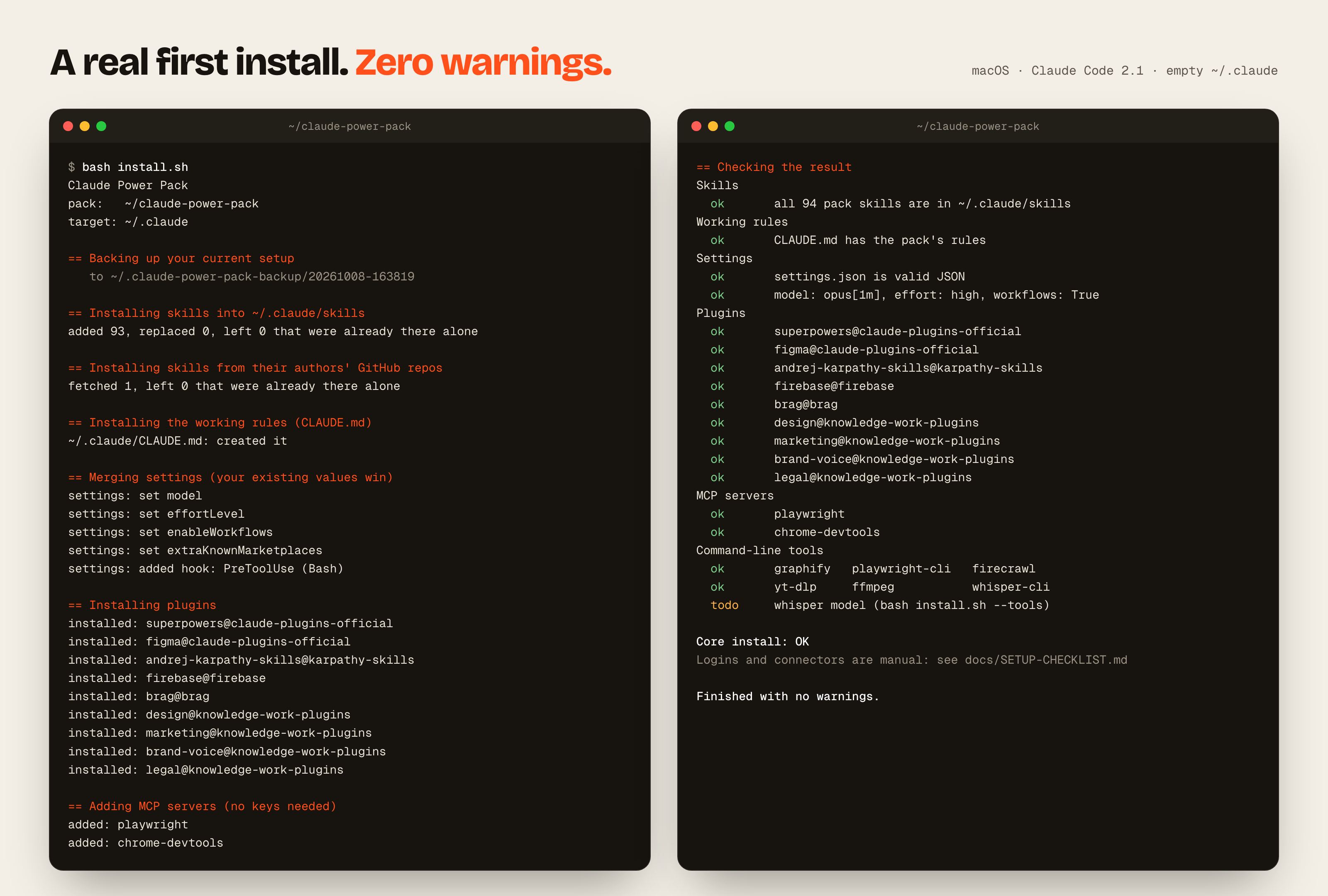
Before it touches anything, it copies your settings.json, CLAUDE.md and a list of your skills to ~/.claude-power-pack-backup/<date-time>/. Skills you already have are left alone. Only --force replaces your copies, and it backs them up first.
See it before it happens
bash install.sh --dry-run prints every step without changing anything. A real run ends by checking itself with tools/verify.sh, which you can run again any time. It's safe to re-run.
Tested on every change
Every push runs the real installer on clean macOS and Ubuntu machines in GitHub Actions: a fresh install, a second run that should change nothing, and a check that your own settings and rules stay yours.
Your logins stay yours
The installer never asks for a password or API key. You sign in to each tool yourself, in your own browser or Terminal. The installed rules also make Claude ask before it spends money, deletes data, creates accounts or messages anyone.
Open source, credited
The pack's own code is MIT licensed. Most skills were written by other people and keep their own licences (MIT, Apache-2.0, ISC); THIRD_PARTY_NOTICES.md lists each source. Two skills whose repos have no open licence aren't copied here; the installer fetches them from their authors.
The installer's own output, from backup to its final check.
Claude Power Pack is a free, open-source, one-command installer for a complete Claude Code setup. It adds 94 skills, 9 plugins, a set of working rules, tuned settings and two browser MCP servers, and includes a guide to 14 claude.ai connectors and 15 desktop extensions. It's an independent community project with no ties to Anthropic.
What is a Claude Code skill?
A skill is a folder of instructions, sometimes with scripts, that teaches Claude how to do one kind of job well. Claude Code keeps only each skill's short description in context (about 10k tokens for all 94 in this pack) and loads the full instructions when a task needs them. You don't have to name a skill: describe the outcome and Claude picks one, or type / and the skill's name to call it directly.
Do I need Claude Max?
No, Claude Pro works too. The pack sets Claude Code to Opus at high effort, which is why it's tuned for Max; on Pro you'll hit your usage limits sooner. You can switch models for a session with /model.
Does it cost anything?
The pack is free and MIT licensed. You need a Claude plan that includes Claude Code, such as Pro or Max. Most of the tools it connects to have free accounts, but a few need paid ones: Higgsfield credits for AI image and video, an Ahrefs plan for SEO data, and DaVinci Resolve Studio for the two Resolve editing skills.
Will it overwrite my existing Claude Code setup?
No. Before it changes anything it backs up your settings.json, your CLAUDE.md and a list of your skills to ~/.claude-power-pack-backup/<date-time>/. Skills you already have are left alone, settings you've already set keep your values, and the working rules are added in a marked section of your CLAUDE.md. Only the --force flag replaces your copies, and they go into the backup first.
Is it safe to install?
Everything in it is readable text: Markdown skills, a bash installer and a small Python script that merges settings. Run bash install.sh --dry-run to see every step before anything changes. The installer never asks for a password or API key; you sign in to each tool yourself. Third-party skills are copies of public open-source repos, each listed with its source in THIRD_PARTY_NOTICES.md. As with any script, read it before you run it.
How do I uninstall it?
Your previous settings.json and CLAUDE.md are in ~/.claude-power-pack-backup/<date-time>/, so you can copy them back. To remove only the rules, delete everything between the claude-power-pack:start and claude-power-pack:end lines in ~/.claude/CLAUDE.md. Remove plugins with claude plugin uninstall <name> and MCP servers with claude mcp remove <name>. Skills are plain folders in ~/.claude/skills; delete the ones you don't want (skills-before.txt in the backup lists what you had before).
How do I update it?
It updates itself. Once a day, in the background, it checks this GitHub repo for a new version. It then updates only the pack's own skills and rules that you haven't changed, adds new skills, and tells you what changed at the start of your next session. Anything you edited stays exactly as you left it, and it never installs software on its own. Turn it off with: bash ~/.claude/power-pack/auto-update.sh off
Does it work on Windows?
Windows is untested. WSL may work. macOS is the main target, and on Linux the skills, rules, settings, plugins and MCP servers work; the desktop extensions and the Homebrew tool install are Mac only.
What do I still have to do myself?
Logins. Connectors, API keys and command-line sign-ins belong to your own accounts, so you do them once by hand: connectors at claude.ai > Settings > Connectors, desktop extensions in the Claude desktop app, and tools like firecrawl login or npx wrangler login in your own Terminal. docs/SETUP-CHECKLIST.md lists every one, and most are free.